Monday, November 14, 2011

Too Much


11-14-11
Some days the flood of ideas, requests, opportunities is just overwhelming – not in a bad way, rather in an overexcited way. So today
1.     iPad broadcasting to the Smartboard/projector – I was playing with my iPad this weekend when I found that I could mirror the iPad on the TV via Apple TV. This would certainly be useful in the classroom but is there an app that can do it? If so the $99 cost of Apple TV would not be justifiable, if not then we need to use this. There are many teachers that would love to broadcast to the board. The students could share their work if they chose to.
2.     iPad apps and wiki collaboration  - I have been struggling with all the apps that are available and how to share them. We want to have teachers (all now have iPads) to find and share any apps that are useful. I have been working on a wiki to help this sharing and will let the teachers know of it at the next faculty meeting.
3.     eBook and Kindle library book checkout – Our head librarian came to me 5 minutes ago and talked to me about electronic checkout of books for our library. I had heard that the public library was doing here but now we might have the opportunity to house electronic checkout right here. The company is called Overdrive and we will be doing a little research on this.

Collaborate Anywhere


11-10-11

The amazing thing about the mobility of computers and iPads etc is the ability to stop and have a meeting anywhere anytime. An example – today I was on my way to my room when our Latin teacher came up to me to show how the students were using their iPads to video a skit, place that video into Keynote and assemble slides and multiple videos to then show to the class. The issue was how could they share the videos so that they could embed others videos into their own Keynote presentation. We were looking at emailing them to themselves then opening in dropbox etc. We ended up videoing on the iPad, editing in iMovie, sending it to the camera roll then uploading to dropbox where any student could download the movie to import into their Keynote presentation – ALL on the iad!
SO – On the spot once we had solved the problem, the teacher videotaped me walking through the steps so that we would not forget it, then we uploaded that video to youtube to view.

Video below (you tube link is http://youtu.be/mYcHnuB2o74)


2 month review


10-31-11

The iPads have now been in use at the school for 2 months. The students have lost a few styluses, several have found ones that they like more than those handed out, and the teachers have begun to request apps that they would like downloaded onto their iPads. We have just improved our wireless system and as far as connectivity goes we are good. We have 47 8th graders using these devices and about 15 of their teachers. The teachers are really doing a wonderful job of integrating them into the classroom and the students are showing that they are capable of properly using this new device.
            I was surprised to find that in the Algebra class that I teach 4 out of the 8 students still complete their homework on paper, of those 4, one felt that there was little benefit in the use of the iPad. This is obviously a surprise but is not the case with the balance of the 47 students. It does warrant some further investigation which I will be completing this month.
            We also recently gave iPads to the k-4 teachers here at school. We spent an afternoon reviewing the features of them and discussion their use in the classroom. What we specifically said was that we will be collecting them again just after Christmas break and that if they were used as a paper weight or as a useful tool either was acceptable. The intent of course was not to burden them with additional work but rather to support them. Additionally I would be visiting the classrooms to share Apps and use that I was able to discover. This seems to be working well and we do have a couple of early adopters who are really helping the other teachers.  What I am also finding is that in order to really be able to help the teachers I have to know and understand their curriculum. So over the course of the year I am going to really make an effort to learn how they teach. I will have to do this across the board with all our grade K-8 in order to really be effective – looks like a several year target.
           
I just attended a leadership workshop and as we happened to begin a discussion on the iPads a few of those at our table began to talk about how their “leaders” had initiated the iPad use. What she said was that the iPads were just given to them with an expectation that they incorporate their use into the classroom. There was really no formal direction given and many felt overwhelmed by this new expectation. As a result she and a few others have begun to meet to discuss and share the opportunity for using them in the classroom. This is something that I had really hoped to avoid here at Harbor Day School and while we might have been able to mitigate it a little, as I look forward I must focus my effort on this. As a note we also introduced a whole new website this year which has pushed the staff as well.

Wednesday, September 21, 2011

First Week Roll Out comments

On the first day of school, September 9th, 2011 the eigth graders were handed two critical pieces of paper which they were required to sign if they wanted to use the iPads and computers at school, (1)  the general Acceptable Use Policy and (2) the iPad acceptable use policy. These were to be signed by the following Thursday (they were going on a trip to Catalina for the first part of the following week). On Friday we handed out iPads to the 47 8th grade students. We reviewed the key components of the Acceptable Use Policy and then began to teach the basics of use. The two goals were to teach how to log into the new Harbor Day School website (where they could get assignments etc.) and next to set up their email accounts. We were able to do this barely in the 50 minutes provided because of various glitches in password changing that was required etc. They went home that weekend and had their iPads in hand.

            Then Monday came around and it appeared that some had downloaded apps themselves. Tuesday rolled around and I think that every student had downloaded apps themselves at home and all were playing games and watching movies. This was not the plan and we immediately addressed it by explaining that per the AUP, all students had were to only download apps that had been approved by me and that could only be done at school under teacher supervision. Further all apps not originally included were to be removed by 10:30 Tuesday morning. They did well with this with only 1 student having his iPad confiscated until Friday for having apps remaining on it during a random check.


SO – other lessons learned

Review app purchase rules
--  Initiate random checks
--  Facetime needed to be blocked as many were abusing it
-- Our wireless system showed some weaknesses in certain rooms – oddly the areas that the teachers sit were in “the zone” but the kids in the corners of certain rooms had no reception – we will be upgrading accordingly
-- With all the students downloading and using the website we need to align the teachers methods of posting assignments
-- Folder organization and structure – we will need to address this with the students because even with one weeks assignments things are beginning to get cluttered – by January it could be a mess without some standards
-- The teachers and students are coming in to see me and comment on the apps and the way the students are using them -  I NEED to create some kind of debriefing for this so that I can begin to develop best practices


This is just the beginning and we already tested them last year with a smaller sample group. I am sure there is much to come.


James Gapp
Harbor Day School

Tuesday, August 23, 2011

Student Roll out – Phase I - unpacking, assembly and naming


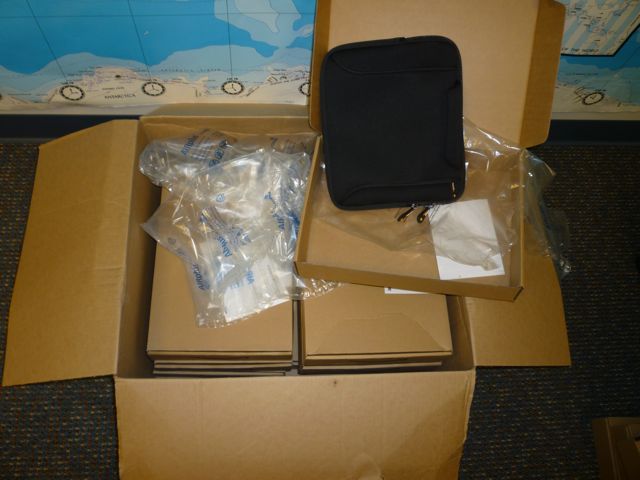
With all the boxes in the room I was ready to begin. I began to take off the first layer of packaging so that I could set up my workstation – I was amazed at the packaging that the Amazon neoprene cases came in – A large box, filled with boxes, each box containing a neoprene case. See below


The first step I took was to try and create a good assembly line for myself. Starting from the left I had the ipads in boxes, the cases, and chargers. On the right I had trash, the famous P-touch label maker and neoprene cases.


The assembly started and I timed it out at 3 minutes per unit. It went quite well and by the end of the day I had completed 50. The next step is to sync them all up.

Thursday, August 18, 2011

Ipad Faculty Roll out Part 1

8-17-11

Lets take a look at the faculty side of the iPad rollout. It is late in the summer and most of the faculty whose students will be using iPads has had an iPad 1 to use since June when summer started. For the past month I have been working to decide

1.     Naming the various logins for the iPad deployment computer and setting up the iTunes accounts for each

2.     What apps their new iPad 2’s will have on them

3.     How to best get those apps onto the iPads

4.     How to pay for the apps

5.     The cases that they will use to hold the iPads AND chargers

6.     The stylus to be used

7.     Labeling conventions, restrictions on the iPads

8.     Philosophical issues

        a.    When do we start training the teachers and what exactly will the training be?

        b.    How does each download new apps

        c.     Can he/she sync with their computer?

        d.    Sharing the classroom use of the iPad

        e.    Sharing the apps that each teacher finds


We have tackled all of these and have now completed 1-6 and some of item 7. I created a spreadsheet to list and track the following

IPad deployment computer Logins                                   
Login, Password, Comments
NEW IPADS - SUMMER 2011                                   
Faculty name, IPad Name, Serial Number, Identifier            , Wi-Fi MAC Address, ITunes Account, Password, Case - tight            , Carry case, Synced with, Backup file password


DEPLOYMENT GUIDE - another spreadsheet to track the deployment


SYNCING
Having just completed the syncing portion I followed the order below – see also the CLICK HERE FOR YOUTUBE VIDEO of the list below – not very exciting but it is an example of what I did to each.

1.     Label the iPad, place in case with charger and stylus
2.     Log into appropriate Mac account on the iPad deployment computer
3.     Plug in iPad
4.     Name iPad and deselect checkboxes to NOT sync all apps etc
5.     Update IOS if needed
6.     Check iTunes account currently logged into (this is somewhat important because it becomes the default account when someone makes their first purchase on the iPad)
7.     Go to the apps heading and select apps you would like to sync
8.     Click sync
9.     Go to the iPhone config utility and install on the iPad
10.  Copy all relevant information onto the tracking spreadsheet
11.  Unplug and test to see that there is wi-fi connectivity 


Picture below of final case and iPad put together


DETAILS OF THE CASES AND STYLUS
Item
detail
Link
Comments
Outer carry case
Amazon Basics
http://www.amazon.com/AmazonBasics-Netbook-Handle-10-Inch-Netbooks/dp/B002VPE1Q6/ref=sr_1_2?ie=UTF8&qid=1313531682&sr=8-2
Amazon's neoprene - 11.29
Small case
Case Crown $25.21
http://www.amazon.com/gp/product/B004R7A9NU
Leather style case
Stylus
Roo Case
http://www.amazon.com/gp/product/B004GYVPGE
$8.98 per stylus - rubber 1/2 sphere tip


Tuesday, August 16, 2011

App comment

8-16-11

After several iTunes and iPad OS updates I had to go back and correct the comments about the syncing and erasing of apps. I think that it can be best summed up by the following

1.     Each app carries the iTunes account that it was downloaded with.

2.     That iTunes account must be authorized on the computer that you are trying to sync with.

There are a few scenarios that can make use of the above but it sets us up to have one computer syncing all iPads but we will have different itunes accounts under different logins for each grade and a separate iTunes account for faculty.